Published Date: 20/12/2025
Short Information: The Staff Selection Commission has announced the SSC CGL Tier-II Exam Date 2025 on its official portal, and qualified candidates from Tier-I should now prepare for the next stage as per the published schedule. This update is important for applicants tracking the Combined Graduate Level (CGL) timeline, including exam city details, admit card release, reporting time, and exam-day instructions for Tier-II.
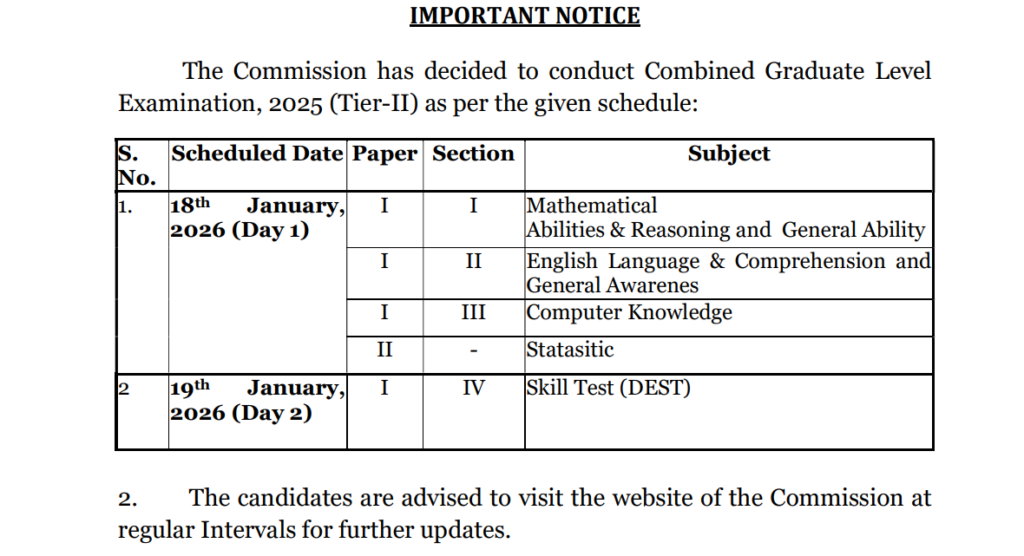
The SSC CGL Tier-II exam is scheduled for 18–19 January 2026, and the admit card will be available online before the exam through the SSC candidate login and regional SSC websites. Candidates should keep their Registration Number/Enrollment ID and Date of Birth ready to download the SSC CGL Tier 2 Admit Card quickly once the link is activated.
Overview |
| Exam Name | SSC Combined Graduate Level (CGL) Examination 2025 |
| Conducting Authority | Staff Selection Commission (SSC) |
| Stage Covered | Tier-II (Computer Based Examination) |
| SSC CGL Tier-II Exam Date 2025 | 18–19 January 2026 |
| Admit Card Mode | Online (candidate login / regional SSC portals) |
| Official Website | https://ssc.gov.in/ |
| Login Details Required | Registration Number / Roll Number (if available) + Date of Birth / Password |
| Admit Card Status | To be released (before the exam date) |
| What You’ll Find on Admit Card | Candidate details, exam date & shift, reporting time, exam centre address, instructions |
| Important Tip | Download early and verify name, photo, category, and exam city/centre details |
| How to Download SSC CGL CBT 2 Admit card |
-
Open a secure browser on your phone or computer and ensure your internet connection is stable.
-
Visit the official SSC website: https://ssc.gov.in/
-
Click on the Login option (Candidate Portal) and open the SSC candidate login page.

-
Enter your Registration Number (or Enrollment ID, if applicable) and your Password/Date of Birth, then submit.
-
After logging in, go to the dashboard and look for the SSC CGL Tier-II Admit Card / Admission Certificate link under the CGL 2025 section.
-
If the admit card is hosted region-wise, select your SSC region (such as CR, NR, WR, ER, SR, etc.) and proceed to the regional admit card page.
-
Click the “Download Admit Card / Print Admission Certificate” button and open the PDF.
-
Check all printed details carefully: your name, photograph, signature, exam date, shift timing, reporting time, centre address, and exam-day rules.
-
Save the PDF to your device and take at least 2 clear printouts for exam day use.

-
Keep a valid photo ID ready (Aadhaar/Passport/Driving License/Voter ID, as allowed) to match your admit card details.
-
If the admit card link is not visible, wait and re-check during peak updates, or try again using a different browser (Chrome/Firefox) and clear cache.
-
If you find an error in personal details, contact SSC through the official website/helpdesk or your regional SSC office immediately before the exam.



Important Link |
|
| Download Admit Card | Coming Soon |
| Download Exam date | Click Here |
| Home Page | Click Here |
| Join WhatsApp | Join Telegram |
| Official Website | Click Here |